Code is cheap. Personal software is next.
· AI · 8 min read
Coding agents made code cheap. The biggest winners are personal apps and open source projects, where one person can now cover the whole stack end to end. A field report from four small agent-built apps.
TL;DR. Code got cheap. Personal apps and open source seem to benefit most. One person can now cover the whole stack for a niche they actually care about.
Drew Breunig’s post about agentic coding helped me name the question: what should we do when code is cheap? His last lesson stuck with me: code is cheap, but maintenance, support, and security are not. That fits well with the idea of perfect software for an audience of one — if software is cheap enough, it does not need to serve a giant market. It can just fit one person, one team, or one friend group very well.
The trap is that the agent will type almost anything you ask for, even if it fights an earlier request or physics itself. So the real craft is understanding the problem well enough that the cheap code goes somewhere useful. Four small examples, starting with the least sensible one.
Hobby: a stupid app becomes real software
In my friend group we wanted to push ourselves to do more fitness, especially push-ups. At the same time we were playing too many casino-like games: Scritchy Scratchy, CloverPit, and even Schedule 1, which has a very profitable casino inside it.
So the obvious healthy decision was to build a fake gambling app for push-ups.
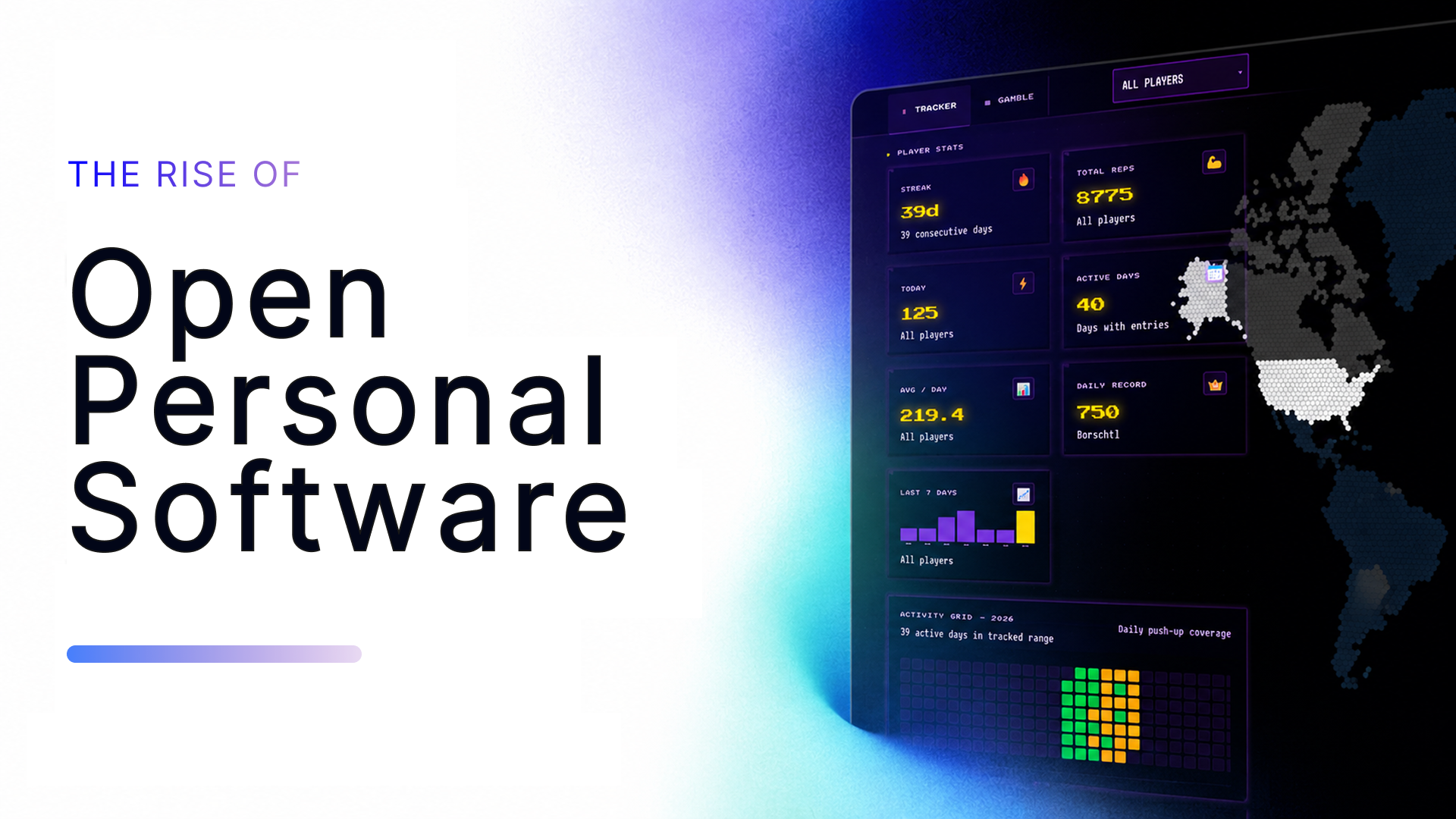
You post our catchphrase in the group chat. A Telegram bot sees it, reacts with a symbol, and stores the push-ups in a database. Later we can spend those push-ups together with items and daily cards to gamble for a weekly crown.
This is my favorite example because it crossed the line from “I built a toy” to “people actually use this”. Once that happens, the code is no longer cheap in the same way. If something breaks, someone complains. If the database changes, old data matters. If an agent edits the app, I need to know what it did.
So I added a small agentic development loop around it, built on GitHub Agentic Workflows. The app has a report button. Pressing it creates a GitHub issue with useful diagnostics. A coding agent picks that up, creates a pull request, and deploys a preview with a copy of the production database. Then a human reviews it before anything ships. That direct flow feels okay here because my friends helped shape the app, and they are developers too. The review is still done by people who understand the joke, the data, and the failure modes. The agent runs inside a guarded workflow instead of freestyling directly on production.
That is the part I did not expect to care about so much. The app is dumb. The workflow around it is not. Cheap code made the app possible. Care made it usable.
Art(ish): making my website feel more mine
I watched this great Sebastian Lague video about complex particle behavior and wanted to try something similar on my website. But shaders and particle systems are their own world. I like watching fire-like behavior, from Conway’s Game of Life to this amazing Particle Life demo, more than I like building every small detail by hand.
So I used agents to help me add small paper airplanes to the background of my personal website. They follow rules inspired by particle life and boids. Close airplanes pull together, each one has a different view radius, and they do not like being in too large a group. It is not a copy of the video. It is the same kind of idea, tuned until it felt like mine.
This is where cheap code feels fun. The feature does not need a business case. It just makes the site more personal. It also has an easter egg if you stay long enough, because of course it does.
The hard part was not asking for “particle animation”. That is too vague. The hard part was taste: slower, less busy, more like paper planes, less like a screensaver. I had to keep saying what felt wrong.
The lesson: cheap code lets you try silly details. But taste is still manual.
Educational: showing people what their ETF really contains
I am very afraid of losing my hard-earned savings to the market gods. So I keep thinking about diversification: countries, industries, asset types, all of it. When I talk to friends, I often hear some version of “just buy S&P 500, Nasdaq 100, or MSCI World”. That may have worked well in the past, but it can hide a lot of concentration.
This is not investment advice. I just wanted a tool that makes the hidden allocation visible.
The idea became Build Your ETF: you describe the country and industry allocation you want, and the app tries to find an ETF mix that gets close to it. I had worked with Operations Research before, especially OR-Tools, so this looked like a nice fit.
Here the agent helped with a lot of plumbing: Python backend, Vue frontend, data loading, UI states, deployment pieces. But the optimization model was not something I could just vibe into place. The first versions were bad in normal solver ways: wrong objective, weak constraints, weird edge cases.
That was still useful. I could tell the agent what was wrong with the model, add constraints, check results, and repeat. It became less like “please build my app” and more like working with a very fast junior engineer who also never gets tired.
The lesson: agents can speed up domain work, but they do not replace the domain. If you do not understand the shape of the problem, you cannot tell whether the answer is nonsense.
Work: learning by doing, not by repeating
At work I wanted to learn more about design thinking. Reading a book or a website is fine. I also found a very cool Design Thinking tutor agent that teaches the method through a guided curriculum.
The agent idea was good. It had structure, checks, and pacing. But using a chat agent as the whole learning surface also felt wasteful. A lot of the token use would be repetition: explain the same method, ask the same check questions, repeat the same structure for the next learner.
So I tried a different shape: a small app where the stable parts are normal content and exercises, and the AI is only used where it adds value. Assessments, open answers, and feedback. The result was ReThink Design Thinking.
This was a good agent project because I had a pretty exact picture of the outcome. I knew the framework, the user journey, and the places where GitHub Models or Copilot should be used. The agent could fill in a lot of the app around that.
The hard part was still the interface between the app and the AI. Getting the Copilot/GitHub Models flow right in a Nuxt app took real checking. The agent could write code fast, but it also happily wandered into wrong assumptions. The useful loop was: explain the target, let it build, run it, take screenshots, point at the broken part, repeat.
The lesson for me was simple: agents are best when I can give them a visible target and quick feedback. If I cannot say what good looks like, the agent will not save me from that.
What I learned
These projects are small, but they pushed on different edges.
- The push-up app showed that maintenance starts as soon as real people use the thing.
- The art project showed that taste still has to come from somewhere.
- The ETF tool showed that domain knowledge still matters.
- The work app showed that agents are good when the target is visible.
Personal software is about to get a lot better
Personal software and open source are in a weirdly privileged position right now. They do not have to defend a market they already found. A startup with product-market fit has to be careful with every change. A personal app or an open source project can try the next idea on a Sunday and throw it away on Monday.
This is not new. Excel was arguably the first mass personal-software platform: millions of tiny spreadsheet-apps built for one job, one team, one problem, almost none of them meant to leave a single laptop. Coding agents push that same idea into real software. Tools like Base44 aim at the “describe an app, get an app” end of the spectrum, and GitHub has been showing hockey-stick repository growth for years, with sharper jumps as AI-assisted coding kicked in.
My prediction: personal apps and open source projects will keep getting more sophisticated, until a lot of them are genuinely competitive with the bigger commercial options. Not because one person can outwork a real company, but because one person can now cover the whole stack end to end, and only has to make it good enough for themselves, their friends, or the niche they actually care about. The make-or-buy line shifts with that. If a tool needs to fit your exact habits, building it yourself starts to make sense. If the hard part is trust, security, support, legal risk, or boring uptime, buying is still smarter.
Code is cheap now. The expensive part is knowing what you mean, checking whether it works, and deciding whether you want to care for it after the first version ships. Exciting, scary, and honestly pretty fun.